
An easier way to identify and update drivers
3DP Chip is a free utility, benchmark, and driver updater designed to keep your Windows system's hardware drivers current. This program rapidly identifies your computer's components, like your CPU and video card, then assists you in downloading and updating their drivers. It's particularly helpful for troubleshooting and ensuring smooth system operation.
Without using 3DP Chip, your device’s outdated drivers can cause slow performance or frequent crashes, and this program simplifies this critical PC maintenance. Being lightweight and safe, it offers you a direct approach to driver management, making it an essential tool for maintaining your system's health and security with ease.
Gone are the days of manual driver updates
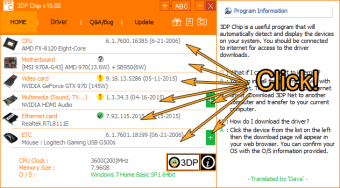
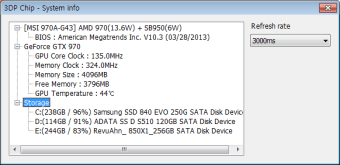
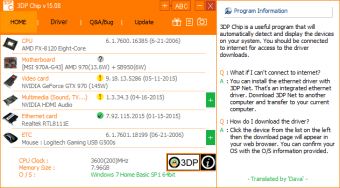
When you open 3DP Chip, it swiftly scans your components, providing a detailed hardware readout you can easily copy. Its primary strength is offering direct links to official driver homepages, ensuring you download from trusted sources and minimizing any risks. It even remembers previously used drivers, like a system restore point, which can be useful when you need to reinstall them.
The UI is very clean, and it readily detects all available components, marking them with a green check for updated drivers, yellow punctuation marks for drivers that need updating, and a question mark for unknown or parts without info on their database. Simply click the icons and you’ll be directed to the program’s website, with the latest supported driver available to download.
You should be aware, however, of 3DP Chip's quirks. Its simple interface has a slight learning curve due to minimal iconography, requiring you to rely on trial and error. While it links to the correct driver sites, it doesn't integrate with your preferred browser. More automated alternatives exist, but for direct driver source linking and simplicity, it remains a reliable choice for you.
A useful, essential tool
Ultimately, 3DP Chip's main purpose is to make the often-intimidating process of driver identification and updating more intuitive and less error-prone for you. Its ability to directly link you to official sources and its minimal impact on system resources make it a valuable addition to your utility toolkit. As it's completely free and exceptionally lightweight, you have little reason not to try it.